





This month, we’re introducing significant enhancements across nearly every area of the Alphathena platform, including updates to Accounts, Trading, Rebalancing, Smart Withdrawal, Tax-Loss Harvesting, Sleeves, Reporting, and Client Integrations. We’re also adding important stability improvements and bug fixes to better support your core workflows.
Summary of Updates
This release delivers major improvements in:
- New Home screen and navigation experience
- Single unified Account view
- Portfolio management and modeling capabilities
- Sleeve 2.0 with sleeve-level cash management and lot splitting
- Rebalancing and tax-loss harvesting workflows
- Order execution flexibility
- Smart Withdrawal optimization
- Reporting capabilities
- Data and security management
- Integrations and workflow automation
- System-wide reliability and performance
New Features and Enhancements Details
Platform and Navigation
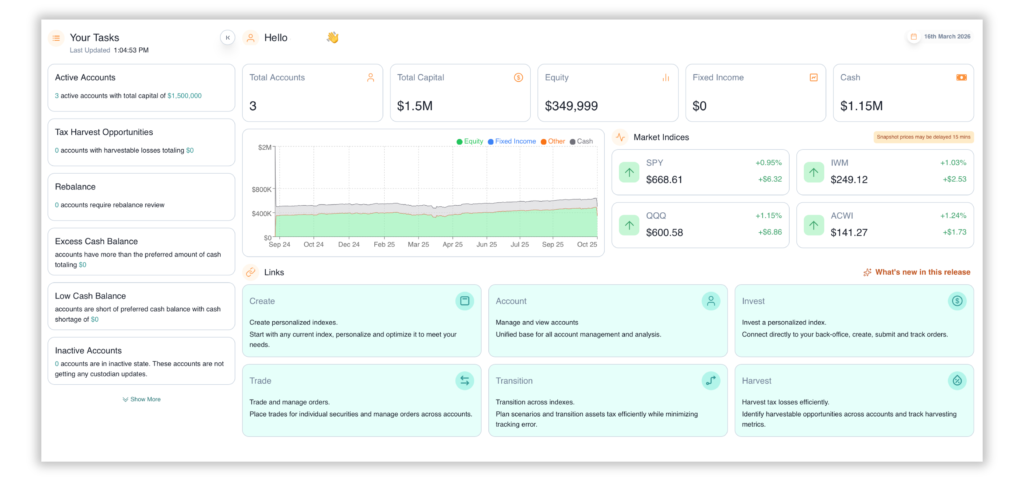
Homepage Redesign
The new homepage provides a comprehensive summary of the firm with quick access to tasks and frequently used modules.
Navigation Upgrade
The redesigned navigation bar delivers a more intuitive way to navigate between models and modules. Users can pin frequently used modules for quick access.
- New home base with all firm-level information
- Quickly review and act upon key workflow tasks
- Quickly jump across any view
- Pin favorite views for ready-access
Unified Account View
A new single-screen view consolidates all account details in one place, providing a summary at the household, account, or sleeve level including realized/unrealized gains, positions, and tracking error.
- Summarizes holdings at the household, account, or sleeve level
- Realized and Unrealized gains at your fingertips
- Template drifts and sleeve-level Tracking Error
- Immediately jump between account-level or sleeve-level tracking
- Dynamically organize and rearrange views
Portfolio Management and Modeling
Unified Index Selector
Personal and firm indexes are now consolidated under a single Models view. All models are tagged as either Personal or Firm for easy filtering. Users with sharing privileges also have full edit and update access to any shared indexes and models.
Unmanaged Model Allocations in Templates
Templates now support unmanaged model allocations, enabling true Unified Managed Account (UMA) structures. Unmanaged models receive their target allocation but do not require a model within Alphathena, allowing third-party managers to operate without creating a separate account.
Rebalancer Multi-Sleeve Support
The rebalancer has been enhanced to support multi-sleeve rebalancing within a single template, including proper handling of unmanaged sleeve allocations.
Optimized Inter-Sleeve Trading
All trades within an account are now netted across sleeves. Opposite trades are automatically offset within the account before being sent to execution, significantly reducing the total number of trades generated.
Auto Assign Optimizer
Automatically assigns lots to the appropriate sleeves within a complex template, eliminating the need for manual lot assignment.
- Streamlined Portfolio Association refresh workflow.
- Template Create now displays security-level weights.
- Restricted security list auto-updates using splits.
- Updated in-app whitepaper.
- Factor data now displays without requiring a base index.
- Added support for “Unmanaged” sleeves in templates.
- Fixed Index Selector state when no indices exist.
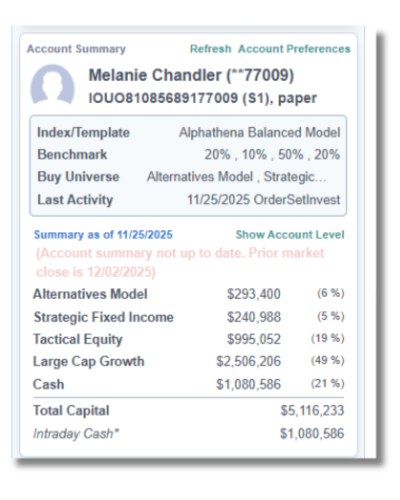
Sleeve Management Upgrades
Sleeve-Level Cash Management
Each sleeve can now independently track and manage its own cash balance.
Lot Splitting
Lots can now be split across sleeves for more precise allocation and management.
Unmanaged Sleeves
Sleeves can be designated as unmanaged, allowing external managers to handle allocations without requiring an Alphathena model.
Sleeve Association Validation
When a template is associated with an account that has sleeves enabled, all sleeves must be properly associated. If any sleeve associations are missing or incomplete, the account header and associations screen will flag them for review.
- Multiple sleeve creation via copy from existing sleeves or templates.
- Sleeve-to-sleeve rebalance cash propagation improved.
- Sleeve Workflow API now lists all firm sleeves.
- Added Sleeves column to Workflow tab.
- Harvest screen label dynamically updates to “sleeve-level” when applicable.
- Added sub-advisor threshold option in Workflow tab.
Rebalancing and Tax-Loss Harvesting
“Use All Cash” On by Default
Rebalance and tax-loss harvesting now default to “Use All Cash” enabled. This is a change from prior versions where this setting was off by default. Going forward, rebalancing will use all available cash in the account unless explicitly turned off. For Tax-Loss Harvesting, the optimizer will deploy existing cash to fund replacements. In both cases, the account’s minimum cash threshold is honored.
Preset Column Configurations
The rebalancer now allows you to create and save preferred column orders for both Rebalance and Tax-Loss Harvesting views, making it faster to focus on the data that matters most to your workflow.
1-to-1 Tax-Loss Harvesting Improvements
Sector ETFs are now available as replacement options alongside individually selected securities, providing more suitable and diversified alternatives for tax-loss harvesting.
Fractional Share Restrictions by Security
You can now restrict fractional share purchases for specific securities, even when the client or custodian generally supports fractional trading. This is particularly useful for ADRs and other securities where custodians do not support fractional shares.
- Fixed payload mismatches between Rebalancer and Transition settings.
- Resolved failures when all conditions were not met.
- Cash updates now supported in sleeve-to-sleeve rebalance operations.
- TLH workflow alerts can now be set as a percentage of account size.
- Users can define a default replacement ticker (e.g., ETF) for 1-for-1 swaps.
- Improved sleeve-level cash handling and display.
- Enhanced wash sale logic for substantially identical ETFs.
- Fixed buy universe retrieval with restricted securities.
- Corrected ETF optimization logic in Create tab.
- Optimized cash detail calculations in TLH replacements.
Account Management
Streamlined Portfolio Association
The association process for accounts and sleeves has been simplified. When a template is associated with an account, sleeve-level associations are handled in a unified workflow.
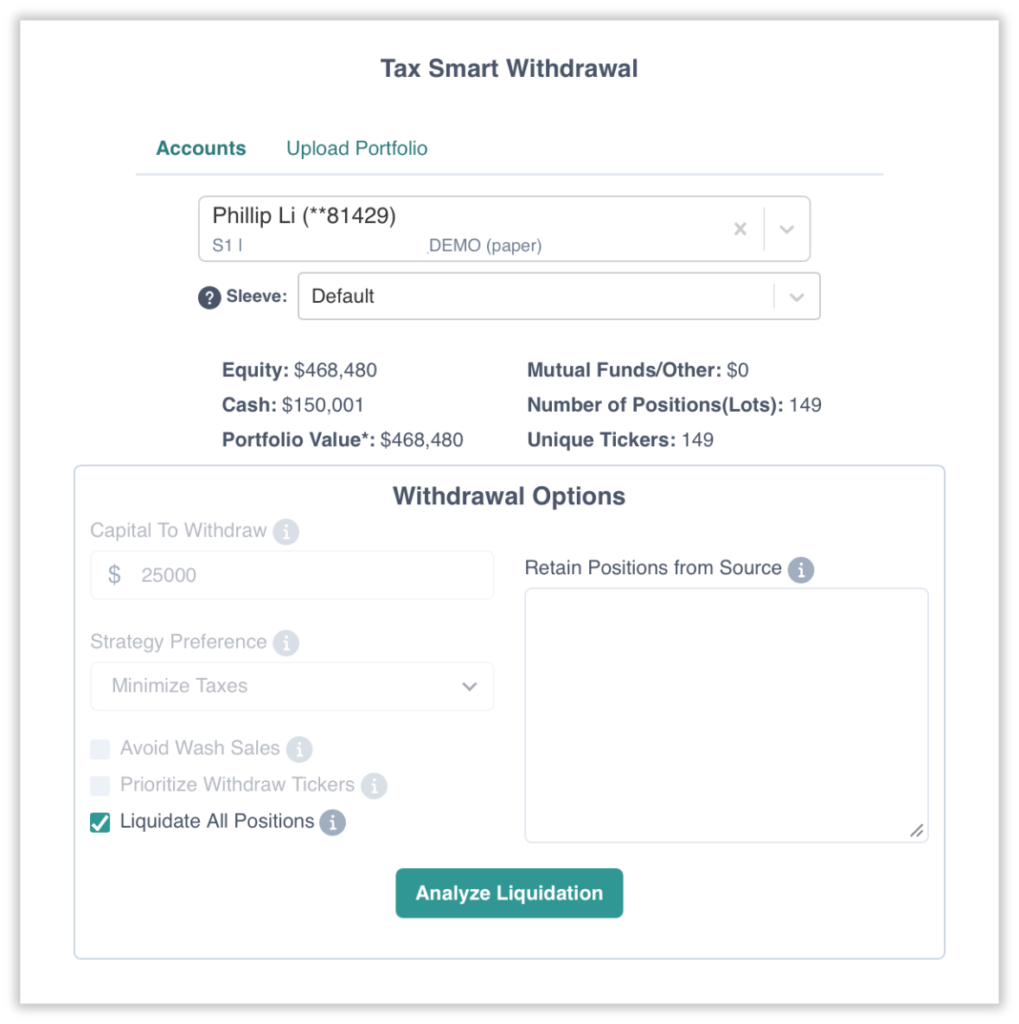
New Liquidate All Option
Smart Withdrawal now includes a Liquidate All option to liquidate all positions in a sleeve or account in a single action.
Demo Account Creation with Uploaded Lots
Users can upload a portfolio and create a demo account for prospect analysis. Demo accounts can be created directly from the Transition page using the uploaded portfolio to run transitions.
- Fixed discrepancies in Equity / Fixed Income / Mutual Fund values across views.
- Manage tab now correctly displays account-level data.
- “Add Account” shows sufficient account detail.
- Fixed benchmark display issue when template is invested.
Smart Withdrawal
Dedicated Navigation Access
Smart Withdrawal has been promoted with its own dedicated navigation bar entry, removing the need to access it through the Transition workflow.
- Fixed workflow when using uploaded portfolios.
- Optimized “Minimize Deviation” calculation (no longer correlation-dependent).
- Added ability to raise cash across an entire template using ALL sleeve option.
- Added sleeve-level liquidation capability.
Trading and Order Management
Block 2.0 Auto Close
If you are using Block 2.0 for order blocking across accounts, you can now configure automatic block closure at 2:30 PM or 2:45 PM Central. Once enabled, any open blocks will be automatically closed at the selected time.
OMS Error Display
The OMS screen now displays any errors received during trading, associated at the individual order level for easier troubleshooting.
- Reversal Trades — Added support for generating reversal trades directly within the platform.
- Individual Master Allocation Orders — Allocation orders can now be executed at the individual master account level.
- Order Splitting by Account / Account Group — Orders can now be grouped and submitted by account or account group.
- Transition Tab – Force Sell — Added ability to force a sell-off of a security directly from the Transition tab.
- Order Preview – Estimated PandL — Added estimated PandL calculation to the order preview screen.
- Allocation Engine Trigger Fix — Allocation engine now correctly triggers trade files at 3:00 PM.
Performance and Reporting
Performance Reports now support Templates, custom direct indices/models without benchmarks, and white-labeled reports.
Data and Security Management
Expanded Master Security
The Master Security list has been consolidated into an expanded universal Master Security that provides finer control over security identifiers. New securities (mutual funds, ETFs, etc.) can now be added same-day.
Integrations and Workflow
Task Schedules
New task scheduling capabilities for managing recurring and time-based workflows.
External Hub Integration for Task Requests
External user-facing and advisor hubs can now submit client requests for PM/Analyst review. Requests are automatically added to the Tasks list, streamlining the intake process.
RedBlack Trade File Support
The platform now supports RedBlack trade file format for trade execution integration.
Get a Closer Look.
Want to take a closer look at any of these new features? Click here now to schedule a time to speak with our sales team.
We’re here to support all your needs across your complete direct indexing and portfolio management lifecycle.